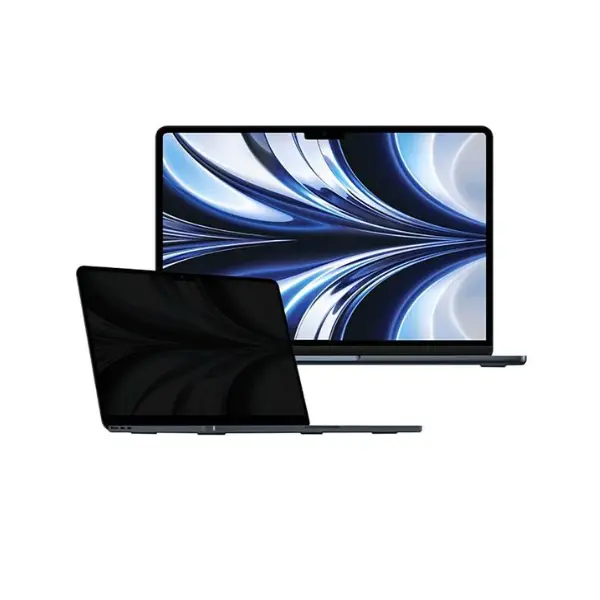
Work Securely Anywhere with the Smartix Magnetic Privacy Screen
The Smartix Magnetic Privacy Screen is the perfect companion for your MacBook Air 13.3 or MacBook Pro 13.3. Designed for professionals on the go, this privacy filter attaches magnetically for effortless installation and removal—no tools required. Whether you’re working in a café, airport, or shared office, it blocks side views up to 60°, ensuring your sensitive information stays confidential. Plus, it reduces blue light and glare to protect your eyes during long work sessions, all while maintaining high-definition clarity from straight on. Available at iCity Bahrain with official warranty and fast shipping across the GCC.
Key Features
Magnetic Attachment for Easy On/Off: The magnetic design allows you to attach and remove the privacy screen in seconds without any tools, making it ideal for shared workspaces or travel.
Blocks Side Views Up to 60°: Enjoy privacy in public places as the filter narrows the viewing angle, preventing prying eyes from seeing your screen from the side.
Reduces Blue Light and Glare: Protects your eyes by filtering out harmful blue light and minimizing glare, enhancing comfort during extended use.
Maintains High-Definition Clarity: While blocking side views, the screen preserves sharp, clear image quality when viewed straight on.
Compatible with MacBook Air 13.3 and MacBook Pro 13.3: Specifically designed to fit these models perfectly, ensuring full screen coverage without interfering with the webcam or sensors.
Frequently Asked Questions
Q: Will the magnetic attachment interfere with my MacBook's magnets or sensors? A: No, the Smartix Magnetic Privacy Screen uses a thin magnetic frame that does not interfere with your MacBook's internal magnets or sensors. It is safe to use.
Q: Can I keep the privacy screen on while closing my MacBook? A: Yes, the screen is slim enough to allow your MacBook to close normally with the filter attached. However, we recommend removing it to avoid any potential pressure on the display.